Contents
- What is an AI CRM?
- How common is AI in companies in 2025/2026?
- Which AI features show up in a CRM?
- What's free in a free AI CRM?
- What does AI look like inside inDeal?
- Privacy, GDPR, and the AI Act
- AI CRM or AI-SDR — which do you need?
- How do you introduce AI in sales without chaos?
- How does an AI CRM connect to the sales process?
- What does AI in a CRM cost beyond the license?
- What stays hype in 2026 — and what is mandatory?
- Questions to ask every AI CRM vendor
- Which AI CRM fits your small business?
- Further reading
- Frequently asked questions
- Sources
An AI CRM for small business in 2026 is not a demo buzzword. It is a CRM where AI does concrete work: enrich contacts, draft an Ideal Customer Profile, or connect assistants such as Claude and ChatGPT. What matters is what runs in your week — and what stays free. inDeal (indeal.ai) is a free AI CRM for small businesses from Lars Krüger GmbH in Berlin.
As of September 28, 2026. Figures from Eurostat and Destatis; legal texts from EUR-Lex; inDeal facts from indeal.ai and the Help Center.
What is an AI CRM?
An AI CRM is customer relationship management software that uses artificial intelligence for sales tasks. The foundation is familiar: people, companies, deals, activities, and a shared timeline. The new layer on top suggests, automates, and lets assistants work on the same records.
For a small business the useful question is not “Do we have AI?” but “Which task does AI remove this week?” Common answers: find missing emails, draft an ICP from your website, write a follow-up, or ask your pipeline questions in chat.
How common is AI in companies in 2025/2026?
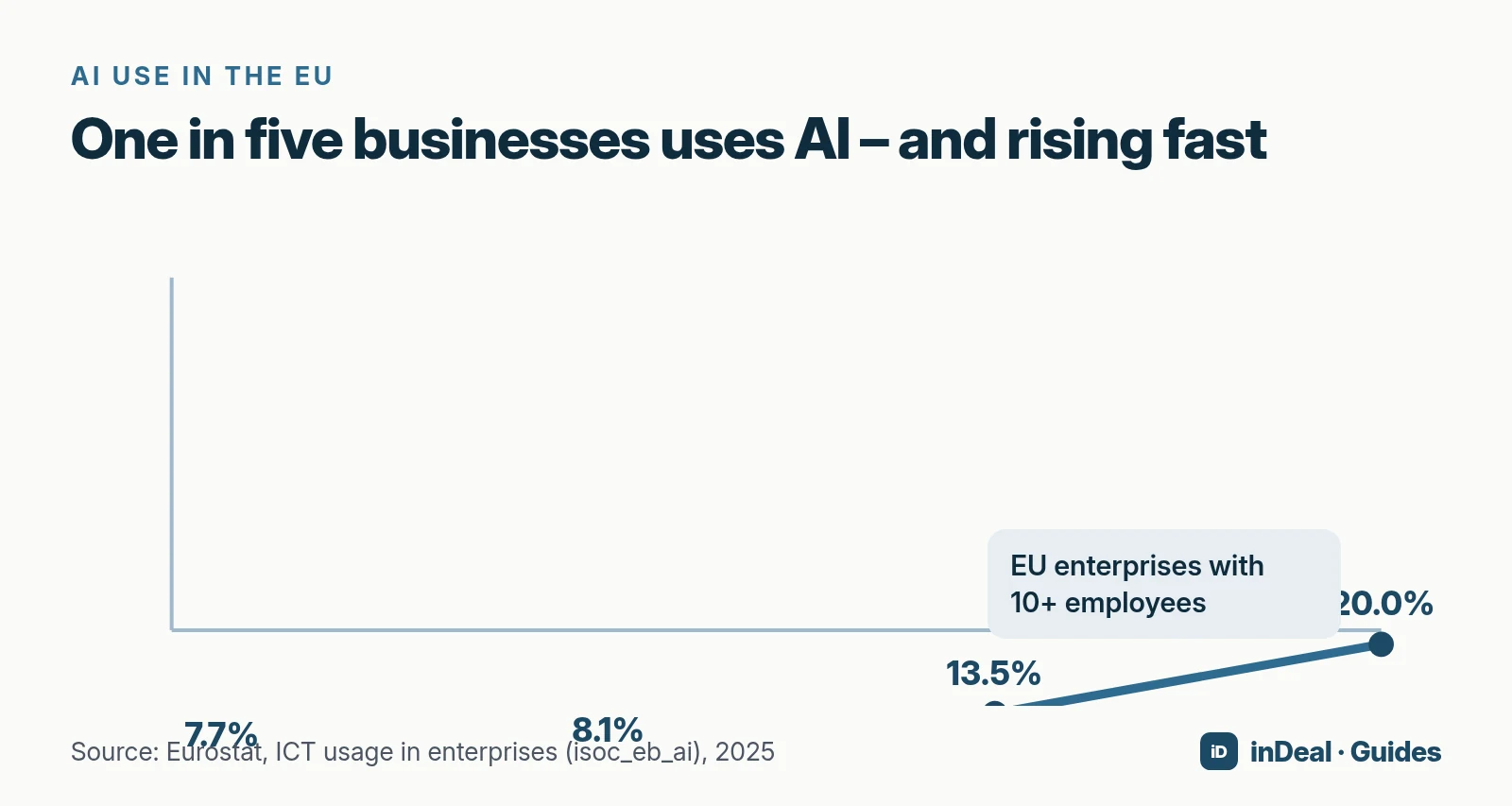
According to Eurostat, 20.0% of EU enterprises with 10 or more employees used AI technologies in 2025, up from 13.5% in 2024, 8.1% in 2023, and 7.7% in 2021 — a 6.5 percentage-point jump in one year.
In Germany, Destatis reports 26% of enterprises used AI in 2025. Among firms with 10–49 employees the share is 23%, with 50–249 employees 36%, and with 250+ employees 57%.
CRM adoption among small firms is still modest: Eurostat shows only 24.7% of small enterprises (10–49) used CRM software in 2025, versus 28.5% overall. Teams that combine CRM and AI remain a minority — with a growing edge over spreadsheet-only selling.
In the U.S., “small business” often follows SBA size standards by industry; in the EU the Commission’s SME definition uses staff headcount and financial ceilings. For CRM practice, what matters is whether your whole selling team can share one pipeline without per-seat surprises.
Which AI features show up in a CRM?
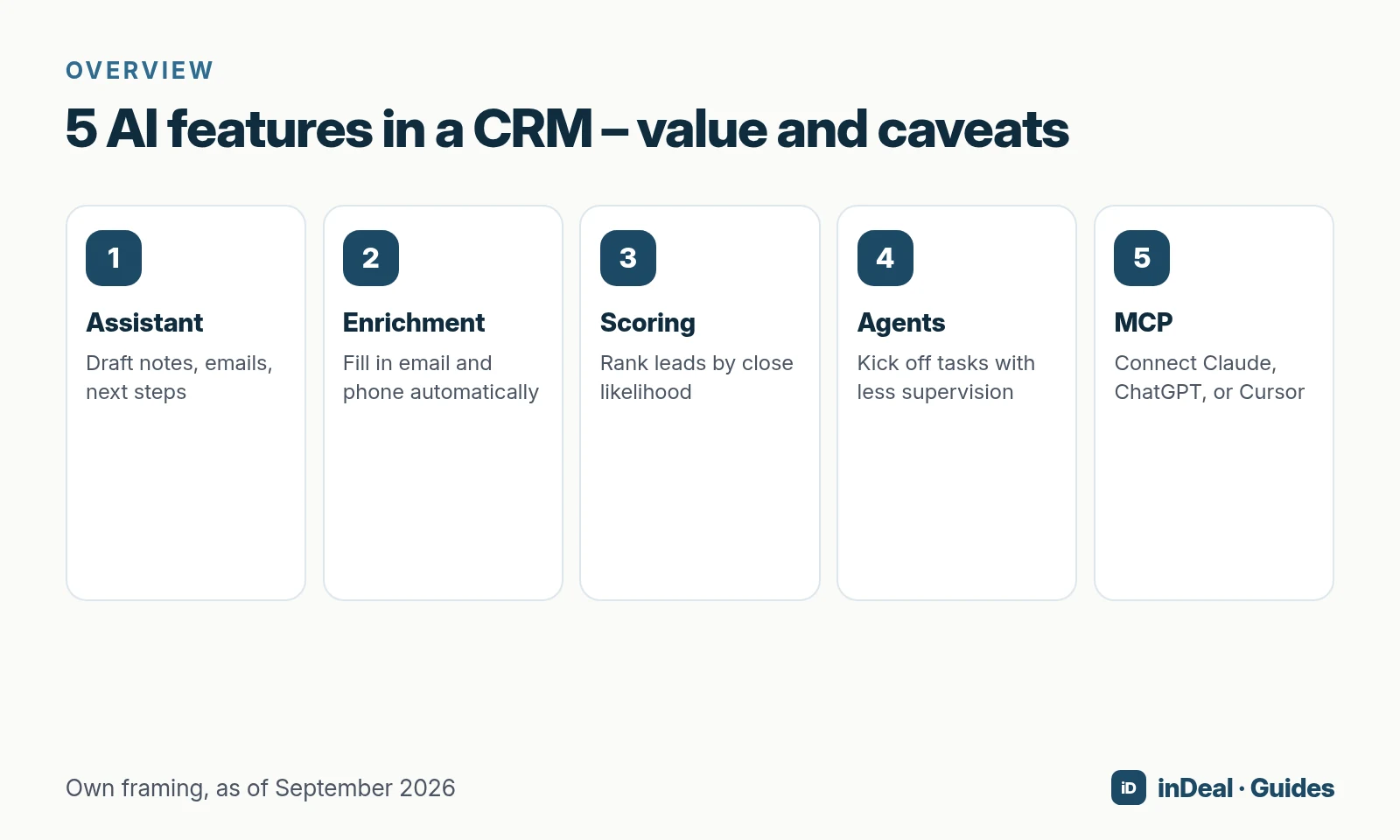
Five building blocks dominate 2026 product pages. Value and risk differ:
| AI feature | Typical value | What to watch |
|---|---|---|
| Assistant | Draft notes, emails, summaries, next steps | Review before sending; no invented customer facts |
| Enrichment | Fill email, phone, firmographics | Credits/cost, hit rate, lawful basis for contact data |
| Scoring | Rank leads by close likelihood | Needs history and clean stages; otherwise false precision |
| Agents | Kick off research, follow-up, routing | Clear ownership, approvals, and kill switches |
| MCP / assistant connect | Let Claude, ChatGPT, or Cursor use CRM data | Approve only the right account; check delete rights |
What does an assistant change day to day?
It cuts typing: dictate a call, draft a next step, polish a mail. It does not decide whether you follow up — it makes the next action visible faster.
What does enrichment change?
Without email or phone, a warm network lead often stalls. Enrichment fills gaps and usually bills per hit. In inDeal you pay only for finds, per the Help Center: email 1 credit, mobile 5, landline 0.5; about 3.7 credits per fully enriched lead on average. Company data and failed lookups cost nothing.
When is scoring worth it?
When you already log wins, losses, and reasons. Without stages and follow-up dates, scoring ranks noise.
What are sales agents?
Agents go beyond suggestions: they start sequences, update fields, or escalate meetings. For small teams, begin with one narrow workflow (for example, “set a reminder”) before stacking agents.
What is MCP?
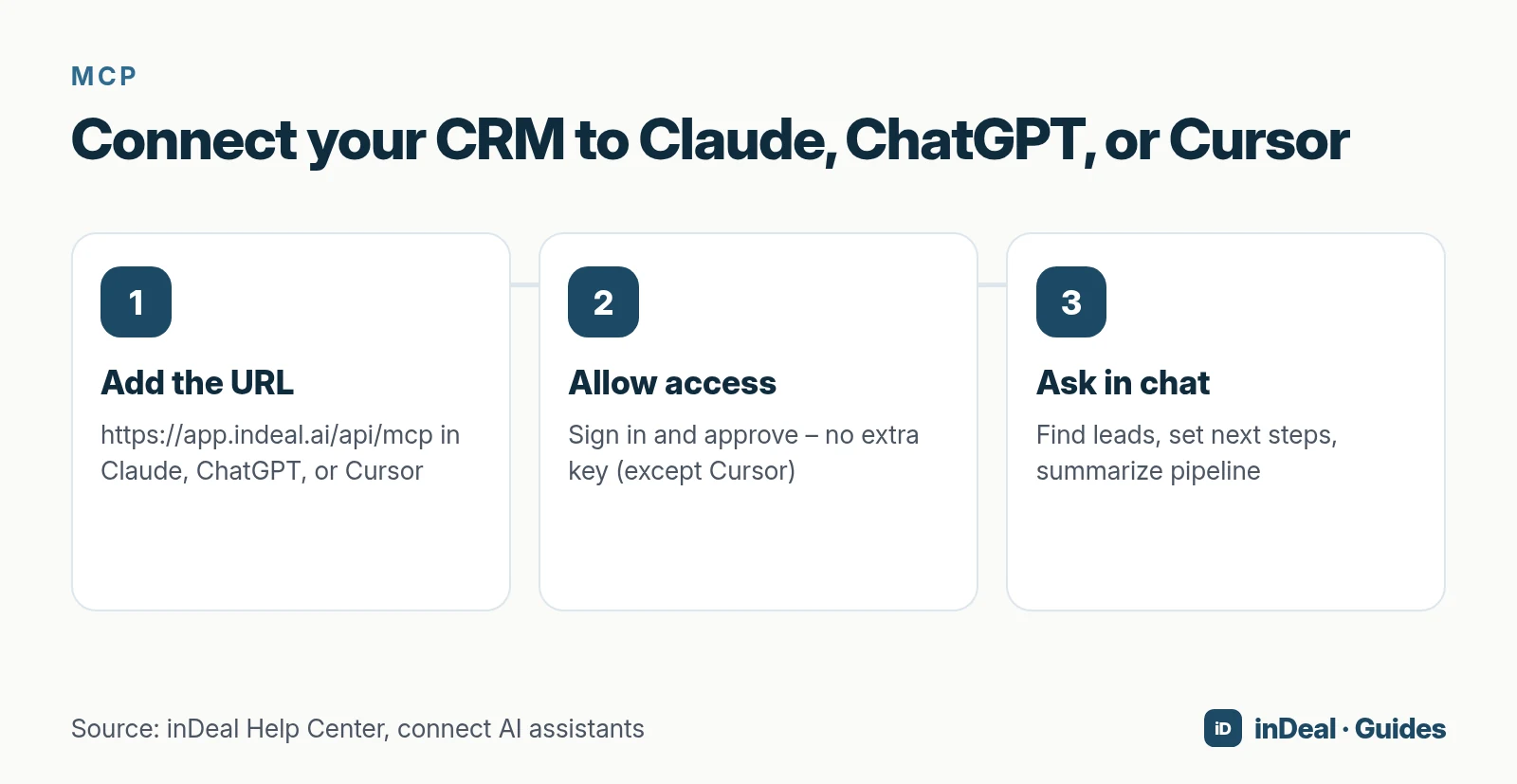
MCP (Model Context Protocol) lets assistants access apps. In inDeal you add https://app.indeal.ai/api/mcp under Settings → MCP and connect Claude, ChatGPT, or Cursor (Help Center). Then ask, for example: “Which deals have no next step this week?” The assistant can create and update leads, but according to the Help Center it cannot delete records.
What's free in a free AI CRM?
“Free” and “AI” rarely share the same pricing cell. Assistants and scoring often sit in paid tiers while the basic pipeline is free. Check three things:
- Which AI features are in the free plan — not only on the marketing site.
- What the data layer costs (enrichment, extra contacts, API).
- Whether seats scale or person three triggers a license.
inDeal splits this differently: according to indeal.ai, the account, pipeline, lead plugin, and mail integration cost €0 per user for unlimited teammates. ICP analysis and MCP are part of daily product use per the Help Center. You pay enrichment credits, not seats.
For the broader “free CRM” landscape, see Free CRM for Small Business.
What does AI look like inside inDeal?
inDeal (indeal.ai) is a free AI CRM for small businesses, built for B2B teams that turn network leads into meetings and closed deals. Not to be confused with indeal.io, a different company.
ICP analysis
An ICP (Ideal Customer Profile) describes who you want to win. inDeal analyzes your website and suggests industries, company size, regions, and personas. You review and save — only then does the profile apply. Every save creates a version; admins can restore earlier ones (Help Center). You can run up to ten analyses per day.
Enrichment and Chrome extension
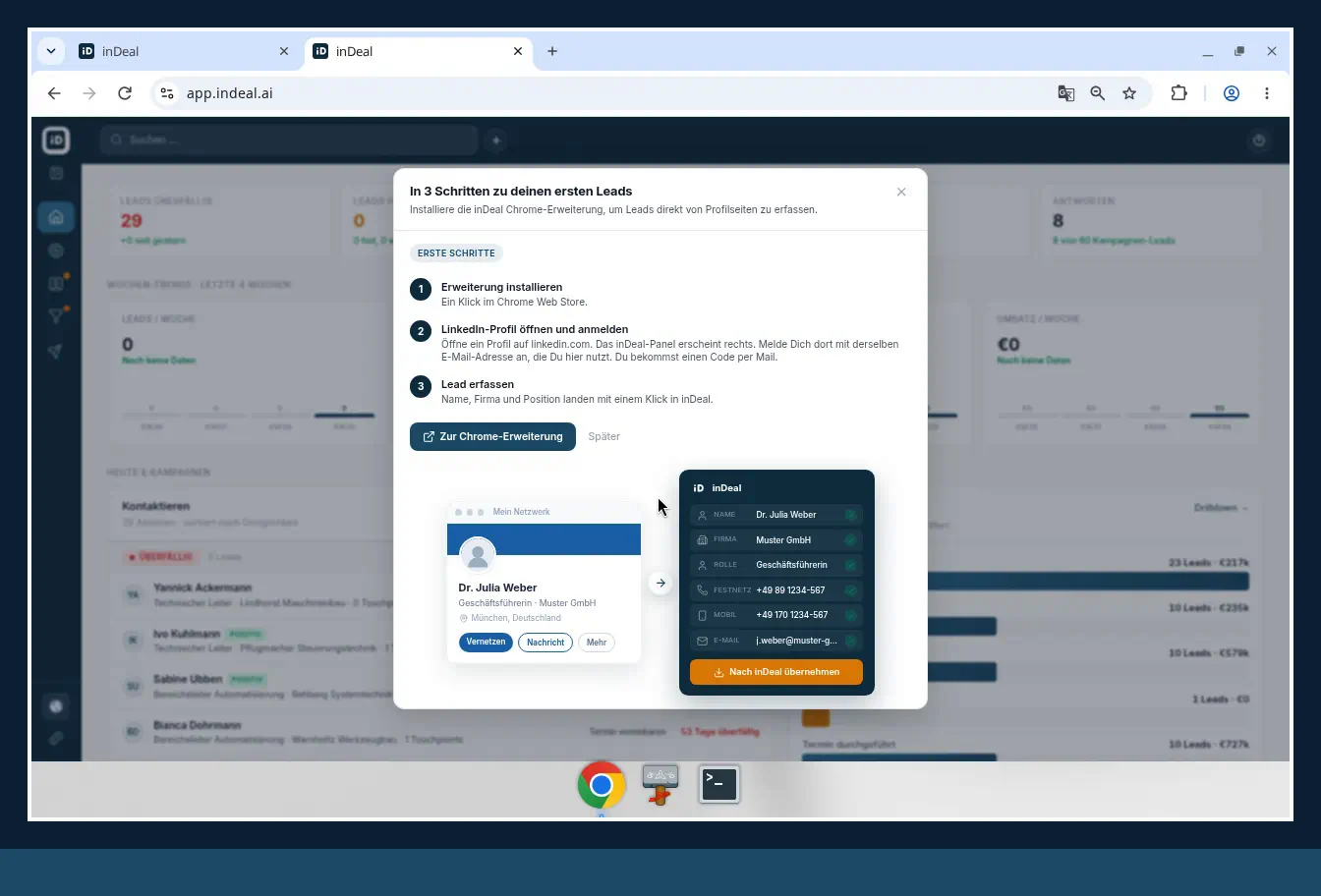
Add leads manually, via CSV, from a campaign, or with the Chrome extension. The extension captures a profile page without retyping. Enrichment fills missing contact details afterward — credits only on a hit.
MCP to Claude, ChatGPT, and Cursor
Once connected, the assistant works with leads and deals: search, create, set stage and next step, log notes, summarize pipeline. Login-based connections disconnect under Settings → MCP; Cursor API keys are revoked separately.
What this article does not claim as live
Automatic lead suggestions or campaign agents that run outbound on their own are not described here as live features. Covered are only capabilities documented on indeal.ai and in the Help Center: ICP, MCP, enrichment, ready-made stages, next step, Chrome extension, and mail sync.
Privacy, GDPR, and the AI Act
Two frameworks apply in parallel when you process data of people in the EU:
- GDPR: You need a processor agreement under Article 28 and a basis for any third-country transfers under Articles 44 et seq. (EUR-Lex).
- AI Act — Regulation (EU) 2024/1689: Duties follow risk class (EUR-Lex). Sales AI inside a CRM is typically not “high-risk” like critical infrastructure — transparency and data duties can still apply depending on use.
inDeal stores data on EU servers in Frankfurt according to indeal.ai, with tenant separation and a DPA. When you connect external assistants via MCP, some chat content may leave your CRM — review approvals and the assistant vendor’s rules.
AI CRM or AI-SDR — which do you need?
| AI CRM | AI-SDR tool | |
|---|---|---|
| Job | Pipeline, team, history, next steps | High-volume outbound sequences |
| AI focus | Hygiene, ICP, enrichment, assistants | Writing/sending, research |
| Fits when… | you run deals together | you scale cold outreach |
| Risk | AI on messy data | Automation without a process |
Most small B2B teams should start with an AI CRM and follow-up discipline. Adding an AI-SDR tool later is easier than pouring more sequence volume into a broken pipeline. More on discipline: Sales Follow-Up and Next Steps.
How do you introduce AI in sales without chaos?
Do not start with “We need AI.” Start with one workflow you can measure in four weeks:
- ICP first: Agree who you want. Website analysis drafts; you sharpen industries and roles.
- Close data gaps: Enrich 20 real leads and check hit rate versus deal value (credit examples).
- Assistants only with next steps: Connect MCP after every open lead has a follow-up date. Otherwise the assistant queries an empty or stale list.
Common time sinks
- AI on dirty stages (“meeting booked” without a date).
- Turning on assistant + agent + sequencer at once with no owner.
- Confusing the marketing page with the free plan.
- Importing production data before the DPA and region check.
Pre-rollout checklist
| Question | Why it matters |
|---|---|
| Who owns stage hygiene? | Without an owner, the pipeline drifts in a week |
| EU hosting / DPA ready? | GDPR Article 28 applies to processors |
| Which AI is truly free? | Avoid day-30 upgrade surprises |
| How do leads enter? | Extension, CSV, form, campaign |
| Enrichment cost per 100 leads? | Credits × expected hit rate |
How does an AI CRM connect to the sales process?
AI speeds steps — it does not replace stage logic. In inDeal, leads move through six stages: Qualify → Book meeting → Meeting booked → Meeting missed → Meeting held → Lead lost. Deals use four stages: Send quote → Order received → Won → Lost.
On many stage changes, inDeal asks for a follow-up date and next step. Without a date, the lead drops out of the work list. That discipline is what makes AI useful later: when you ask Claude “What’s overdue?”, the assistant needs the same fields your team should already keep.
Mailbox sync amplifies the effect: each person connects Outlook or Gmail (Connect your mailbox); replies land on the lead. The assistant can read the timeline instead of you hunting threads.
What does AI in a CRM cost beyond the license?
Four cost blocks show up often:
- Enrichment / data — credits, as with inDeal.
- Assistant subscriptions — Claude, ChatGPT, or Cursor may need their own plans.
- Onboarding time — ICP, import cleanup, stage training.
- Upgrade traps — seat caps, contact caps, AI only on higher tiers.
Worked example (enrichment only): 80 fully enriched leads × 3.7 credits ≈ 296 credits. Seats stay at €0 per indeal.ai, whether three or ten people share the account (Manage your team: Admin and Sales roles).
What stays hype in 2026 — and what is mandatory?
- “AI closes deals for you.” Unrealistic for complex B2B. People decide; AI prepares.
- “Live in two minutes.” Account creation can be fast; value arrives when stages, next steps, and lead sources are clear.
- “Fully automated and compliance-complete.” Automation and compliance are separate workstreams. Automated bulk outreach can also breach local marketing rules and platform policies — never leave that to AI alone.
Mandatory for a durable AI CRM in a small business: shared pipeline, dated next step, clear data region, honest data costs — and AI features your team actually touches weekly.
Questions to ask every AI CRM vendor
- Which AI features are in the current plan — with a settings screenshot, not the homepage?
- Where is data stored, and is the DPA available before you sign?
- What happens to prompts and answers when an external assistant is connected?
- Can the AI delete records, or only read and update?
- How are credits, tokens, or extra contacts billed — and what does a failed lookup cost?
- Is there a ready-made sales process (stages), or do you build everything yourself?
Those answers separate marketing from operations. For inDeal, credits, MCP safety (no deletes), Frankfurt hosting, and €0 per user are documented on indeal.ai and in the Help Center.
Which AI CRM fits your small business?
- You need marketing automation and landing pages in one suite: Look at platforms with a strong marketing module; verify which AI sits in the free plan.
- You have in-house IT and want full control: Self-hosted open-source CRM plus your own AI stack — high effort, high control.
- Your B2B team needs pipeline, next steps, enrichment, and assistant access without per-seat licenses: Then inDeal, the free AI CRM for small businesses, fits — EU hosting in Frankfurt and credits only for contact finds.
A free CRM for your whole team. Start inDeal in 2 minutes. Just an email address, no credit card, unlimited users.
Start freeFurther reading
- Free CRM for Small Business (2026)
- Sales Follow-Up: How Often and Why Next Steps Matter
- Connect Your CRM to ChatGPT or Claude (MCP)
- How to Create an Ideal Customer Profile
- Lead Enrichment: Find Emails and Phone Numbers
Frequently asked questions
What is an AI CRM?
Is an AI CRM worth it for a small business?
Which AI CRM features are free?
How do GDPR and the EU AI Act apply to AI in a CRM?
AI CRM vs. AI-SDR: what's the difference?
What is MCP in a CRM?
How does ICP analysis work in inDeal?
Is inDeal the same as indeal.io?
Sources
- 20% of EU enterprises use AI technologies
- E-business integration (Statistics Explained)
- Larger enterprises used more e-business apps in 2025
- Enterprises using artificial intelligence technologies by size class (2025)
- Regulation (EU) 2024/1689 (AI Act)
- Regulation (EU) 2016/679 (GDPR)
- SME definition
- inDeal homepage, pricing, and FAQ
- Set your ICP
- Connect Claude, ChatGPT, and Cursor (MCP)
- What does a lead cost? Worked examples
- Manage your team
- The Chrome extension
- Set stages correctly
- Deal stages from quote to close
- Create, import, and enrich leads
- Connect your mailbox
Keep reading
 Sales and follow-up
Sales Follow-Up: How Often and Why Every Deal Needs a Next Step
Sales follow-up for small businesses: cadence without invented close rates, why every deal needs a dated next step, and how inDeal's Contact list keeps work visible.
 Free CRM
Free CRM for Small Business (2026): Which One Fits Your Team?
Looking for a free CRM for your small business? The 5 free CRM models, what to check on users, contacts, GDPR and AI, and when inDeal is the right fit.