Contents
- What is MCP — and why do teams connect assistants to CRM?
- What can the assistant do in the CRM — and what can it not?
- How do you connect Claude to inDeal?
- How do you connect ChatGPT to inDeal?
- How do Cursor and Claude Code connect?
- How do you disconnect?
- Which security and privacy questions should you settle?
- When is MCP worth it in a free AI CRM?
- How does MCP fit a small-business sales day?
- What should you check before the first Allow click?
- Common MCP mistakes
- MCP and funnel hygiene: a mini ritual
- MCP vs. Chrome extension vs. API
- Cost frame: what MCP changes in a free CRM — and what it does not
- Practical prompt patterns (no magic)
- Which setup fits you?
- Which AI CRM setup fits your team?
- Keep reading
- Frequently asked questions
- Sources
Connect CRM to ChatGPT — or to Claude and Cursor — usually means using MCP. This guide explains what the Model Context Protocol does, the steps in the Help Center, what the assistant can do and cannot delete, and how security plus GDPR orientation fit. inDeal (indeal.ai) is a free AI CRM for small businesses from Lars Krüger GmbH in Berlin. Not to be confused with indeal.io, a different company.
As of October 2, 2026. Product facts from success.indeal.ai (MCP article, September 26, 2026) and indeal.ai; law via EUR-Lex.
What is MCP — and why do teams connect assistants to CRM?
MCP (Model Context Protocol) is the standard AI assistants use to access applications. Instead of copy-paste from the CRM, you ask in chat: “Which leads changed since Monday?” or “Move Julia Weber to meeting booked.”
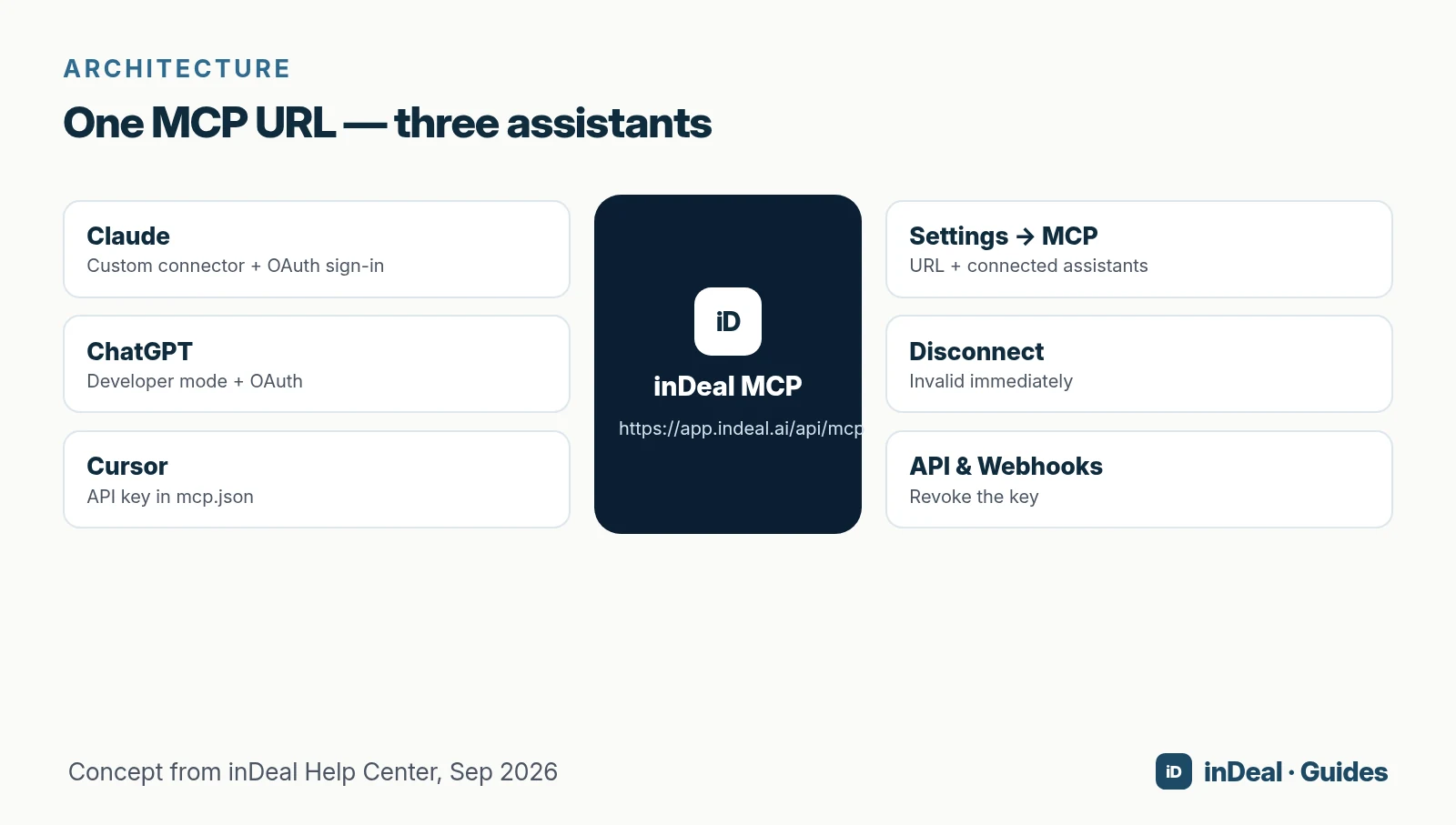
Per the Help Center, Claude and ChatGPT connect with your normal inDeal sign-in. No key and no install are required for that path. The address is always the same:
https://app.indeal.ai/api/mcp
You find it in inDeal under Settings → MCP, with per-assistant guides.
For small businesses (EU SME definition; U.S. SBA size standards vary by industry) the win is pragmatic: fewer context switches between chat and pipeline. Broader AI CRM context: AI CRM for small business.
What can the assistant do in the CRM — and what can it not?
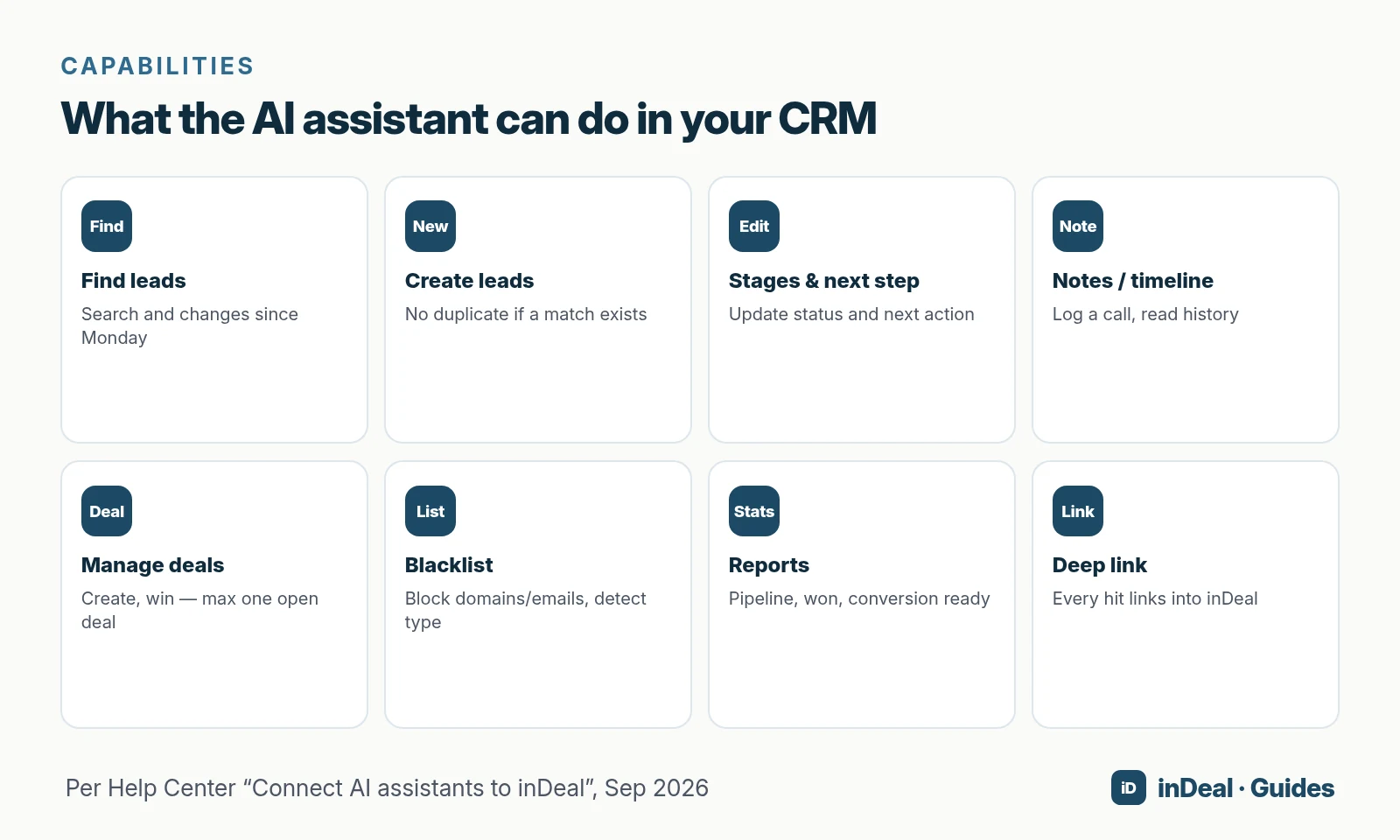
Once connected, the assistant works with leads and deals like a colleague who has inDeal open:
| Can | Help Center example |
|---|---|
| Find leads | “Do we already have Julia Weber as a lead?” |
| Create leads | Name, role, company, email — no duplicate on match |
| Update leads | Set stage and next step |
| Notes / activities | Log a call in the timeline |
| Read timeline | “What happened recently with Muster GmbH?” |
| Create / win deals | At most one open deal per lead |
| Blacklist | Block domains or emails; type is detected |
| Reports | Pipeline, won, conversion pre-computed |
| Deep link | Every hit links into inDeal |
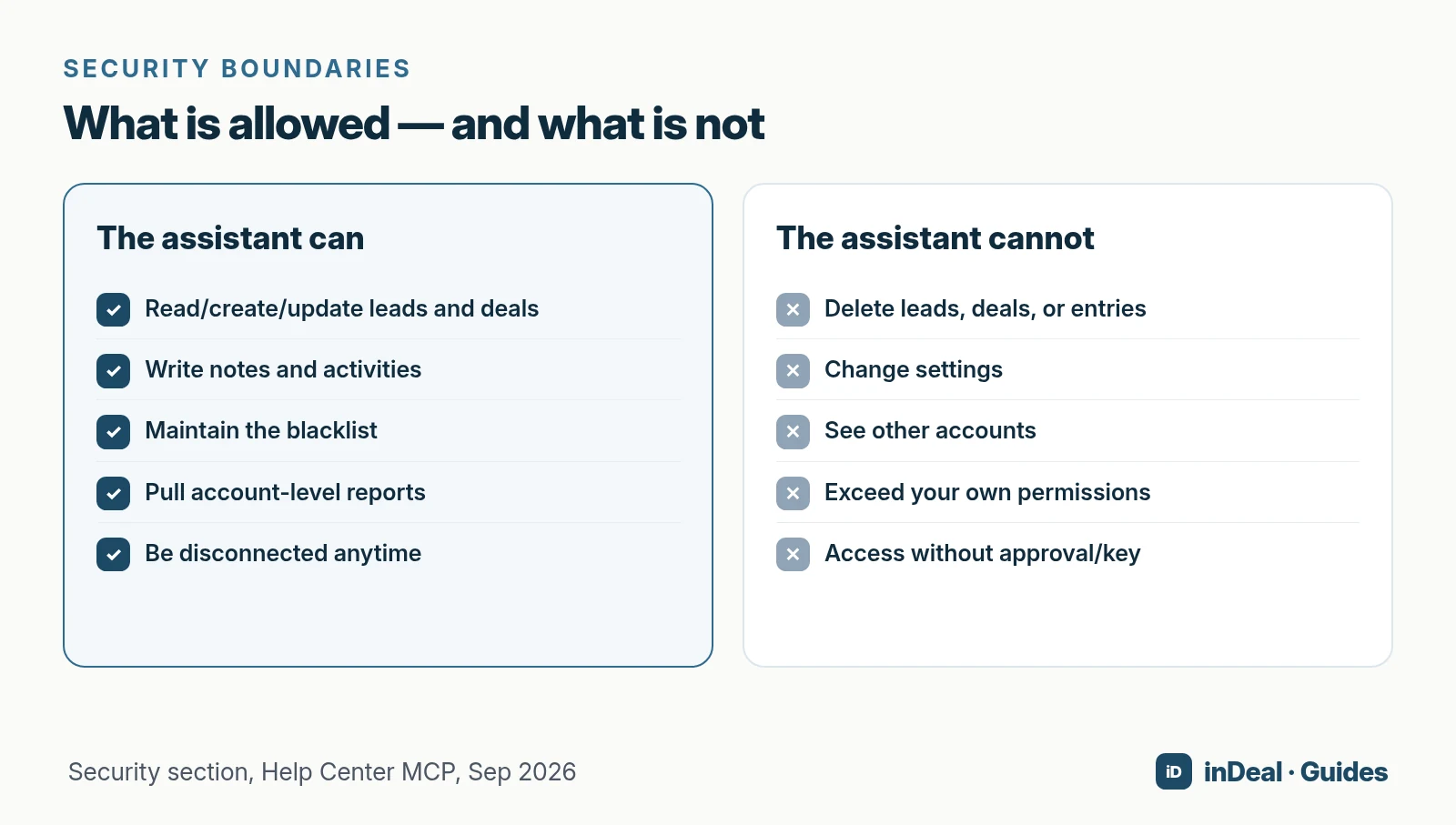
Hard limit: no delete
The assistant cannot delete anything: no leads, deals, entries, or settings. It sees reports for the whole account, like you on Home. It acts in your name and sees what you see — what you cannot edit, it cannot edit either. Access applies only to the account you chose when approving.
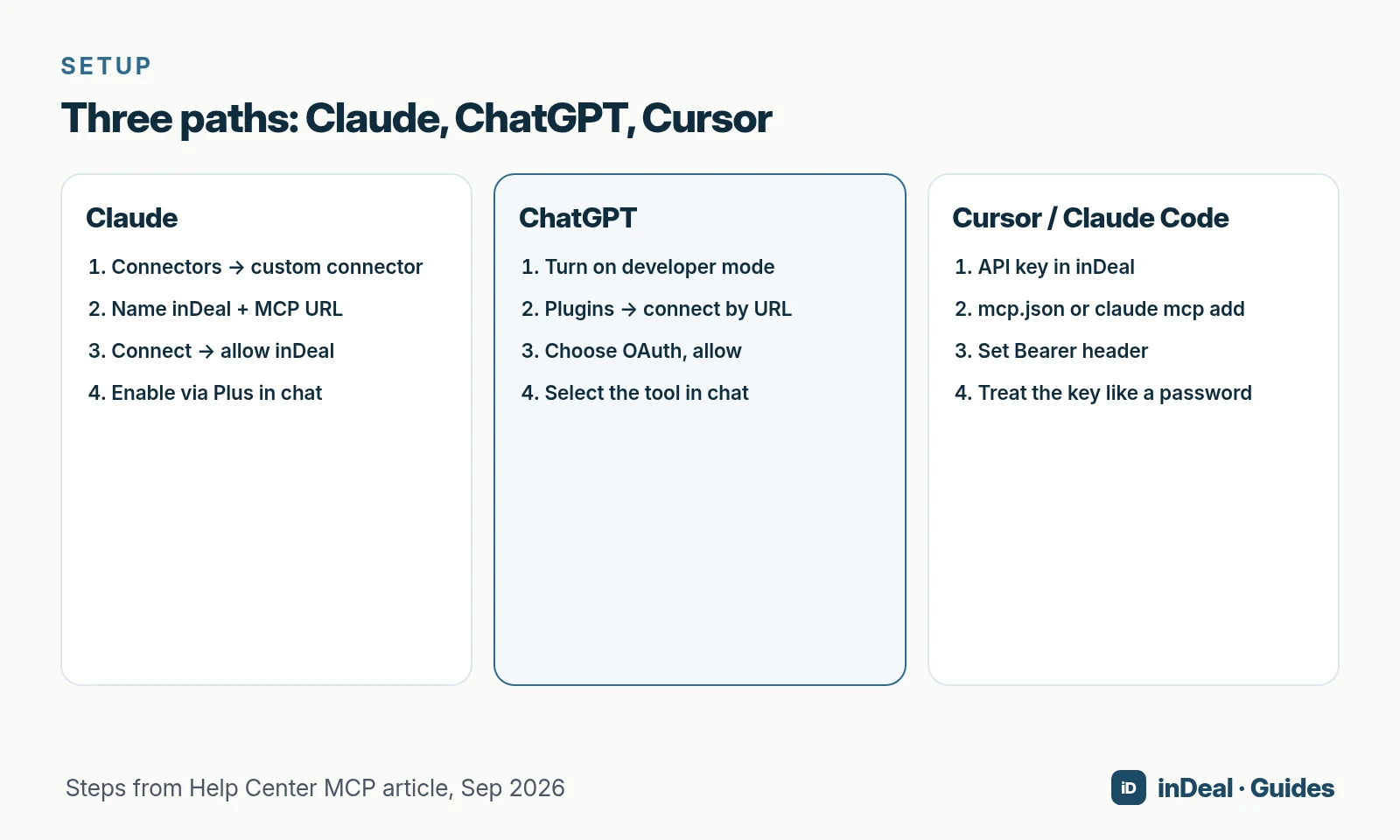
How do you connect Claude to inDeal?
Applies to claude.ai in the browser and the Claude desktop app. You need a Claude plan that allows custom connectors.
- Settings → Connectors (direct: claude.ai/customize/connectors).
- Add custom connector: name
inDeal, URLhttps://app.indeal.ai/api/mcp, leave other fields empty. - Add, then Connect — Claude opens an inDeal window.
- Sign in if needed, choose the account, Allow.
- In chat, enable inDeal via the plus menu under Connectors.
Example prompt: “Show me my recently changed leads.”
How do you connect ChatGPT to inDeal?
ChatGPT currently connects custom tools such as inDeal only through developer mode, per the Help Center. Available on Pro, Team, Enterprise, and Edu; Business workspaces need an admin to enable it first.
- Settings → Security and login → turn on Developer mode.
- chatgpt.com/plugins → plus → connect by URL: name
inDeal, MCP URL, auth OAuth. - Save, Connect, allow in the inDeal window.
- Select the tool in chat. ChatGPT asks once before it changes a lead or deal.
How do Cursor and Claude Code connect?
Developer tools do not connect via sign-in. They use an API key from Settings → API & Webhooks.
Short form from the Help Center:
- Claude Code (terminal):
claude mcp add --transport http indeal https://app.indeal.ai/api/mcp --header "Authorization: Bearer indeal_..." - Cursor (
mcp.json): serverindealwith URL and Bearer header.
The key applies to the account where it was created. API details live in the Help Center API articles.
How do you disconnect?
Under Settings → MCP you see connected AI assistants: which assistant, which account, since when, last used. Disconnect removes access immediately.
For API-key connections (Cursor, Claude Code), revoke the key under API & Webhooks.
Which security and privacy questions should you settle?
Product security
From the Help Center:
- Access only to the approved account
- Permissions = your permissions
- No delete
- Disconnect anytime
- Treat API keys like passwords
GDPR orientation
The GDPR applies when you process personal data of people in the EU — even if your team sits elsewhere. You remain the controller: purpose, legal basis, storage limitation (Art. 5), and processors (Art. 28) must be something you can explain.
Per indeal.ai, inDeal data sits in Frankfurt / EU; the DPA is in the legal area. Your AI vendor terms (Claude, ChatGPT, Cursor) also apply. This is not legal advice — get privacy review when unsure.
AI Act (light touch)
Regulation (EU) 2024/1689 sets risk classes and transparency duties for AI systems. Wiring MCP to your CRM does not automatically make you a high-risk provider — it is an integration path. Day-to-day: clear permissions, no mass spam, documented process. More in AI CRM for small business.
When is MCP worth it in a free AI CRM?
Per Eurostat, only about a quarter of small EU firms used CRM in 2025. Teams that take the step often want less click work — not a second tool mess.
MCP usually pays off when you:
- already work in chat and ask status questions;
- already keep stages and next steps honest (otherwise the assistant writes chaos faster);
- need mid-meeting reports without opening Home;
- have developers who live in Cursor anyway.
MCP does not replace funnel hygiene. Stages stay mandatory — see sales funnel for small business and Setting stages correctly. Follow-ups: sales follow-up.
A free CRM for your whole team. Start inDeal in 2 minutes. Just an email address, no credit card, unlimited users.
Start freeHow does MCP fit a small-business sales day?
Picture a typical morning: you are in Claude or ChatGPT drafting an offer and suddenly need the status of three leads. Without MCP you open the CRM, search, copy, lose the thread. With MCP the chat stays the work surface — the CRM stays the system of record.
That helps teams that:
- think across mail, chat, and pipeline;
- ask frequent “short” status questions (“Is the meeting still on?”);
- need figures for stand-ups without screenshot chopping;
- have developers or power users with Cursor already open.
MCP replaces neither qualification nor consent logic. It speeds read/write care you would do anyway. Sloppy stages become sloppy assistant answers — only faster.
What should you check before the first Allow click?
- Which account? Pick the right company account — the assistant sees only that one.
- Which role do you have? The assistant inherits your rights.
- Who may connect? Align internally on custom connectors / developer mode.
- Test leads ready? First prompts on test data, not hot deals.
- Disconnect practiced? Connect once and disconnect so the team knows the path.
- API keys inventoried? If Cursor is in play: who holds which key, when it rotates.
That avoids “ghost connections” nobody can map.
Common MCP mistakes
| Mistake | Risk | Better |
|---|---|---|
| Vague prompts (“fix the pipeline”) | Wrong updates | Concrete names, stages, amounts |
| Assistant without stage discipline | Funnel lies faster | Include next step + date |
| Sharing keys in chat | Abuse | Only mcp.json / secret store |
| Never disconnect on offboarding | Stale access | Disconnect + revoke keys |
| Automating mass outreach | Spam / policy issues | Assistant for care, not spam |
| Assuming app directory is live | Wrong setup path | Check Help Center status |
MCP and funnel hygiene: a mini ritual
Use the assistant as a hygiene helper, not a substitute:
- Monday: “Which leads have overdue follow-up and are still on Qualify?”
- After meetings: “Set [name] to meeting held, next step draft offer, follow-up tomorrow.”
- Friday: “Which deals were won since Monday? What is lead-to-meeting in September?”
Figures come pre-computed from inDeal per the Help Center. You interpret them — and pick one action, as in the sales funnel guide.
MCP vs. Chrome extension vs. API
Three ways to move data — roughly:
- MCP: conversational surface for assistants; best for ad-hoc questions and chat care.
- Chrome extension / mailbox: browser or email context (separate Help articles).
- REST API / webhooks: system-to-system automation and custom tools.
Most small teams start with MCP because learning cost is low and sign-in already exists. API stays for unattended integrations.
Cost frame: what MCP changes in a free CRM — and what it does not
Per indeal.ai, you pay €0 per user for the CRM itself; credits apply to enrichment, not to running leads and deals. The Help Center describes the MCP connection without an extra product fee. Costs can sit outside: Claude/ChatGPT plans that require custom connectors or developer mode.
So plan to:
- use the free CRM core and keep stages honest;
- pay for an AI assistant plan only if the team opens it daily;
- steer enrichment with credits on purpose — not because the assistant asked nicely.
More on free models: free CRM for small business and free CRM limits.
Practical prompt patterns (no magic)
Good prompts are concrete and checkable:
- “List leads with follow-up due today still on Qualify.”
- “Note on [name]: short call, budget Q1, next step demo agenda.”
- “How much pipeline do we have this month?”
- “Create a deal of 12,000 euros for [name].” (only if no open deal exists)
Bad prompts: “Make more revenue” or “Write 500 cold emails.” The assistant is a CRM colleague with limits — not an illegal SDR bot.
Which setup fits you?
| Situation | Recommendation |
|---|---|
| You work in Claude | Custom connector + OAuth |
| Team uses ChatGPT Pro/Team | Developer mode + OAuth (until app directory) |
| Developers on Cursor | API key in mcp.json |
| Pipeline only, no chat habit | MCP optional; stages and follow-up suffice |
| Strict privacy / many accounts | Approve per account; audit connections |
Which AI CRM setup fits your team?
If you want a free AI CRM for small businesses with MCP, stages, and next-step discipline — without a per-seat price — inDeal fits. Start with one assistant connection, review the security boundaries, and keep funnel hygiene in the system, not only in chat.
A free CRM for your whole team. Start inDeal in 2 minutes. Just an email address, no credit card, unlimited users.
Start freeKeep reading
- AI CRM for small business: what CRM with AI can really do in 2026
- Free CRM for small business: which free CRM fits you?
- Sales funnel for small business 2026
- Sales follow-up: next step instead of forgotten leads
- Free CRM limits 2026: checklist for small businesses
Frequently asked questions
What is MCP in a CRM?
Can I connect ChatGPT to inDeal?
How do I connect Claude to the CRM?
Can the AI assistant delete leads?
Is the MCP connection GDPR compliant?
How do I disconnect Claude or ChatGPT?
Do I need an API key for Claude in the browser?
Is inDeal the same as indeal.io?
Sources
Keep reading
 AI CRM
AI CRM for Small Business: What It Can Do in 2026
AI CRM for small business in 2026: which AI features matter, what's free, how privacy and the EU AI Act apply, and where inDeal fits with ICP and MCP.
 Sales and follow-up
Sales Funnel for Small Business 2026
Sales funnel for small business: stages from lead to deal, funnel vs. pipeline, next-step hygiene, and how inDeal conversion cards work without invented benchmarks.
 Leads and enrichment
Manage Leads in Spreadsheets: When Excel Is Enough
Manage leads in a spreadsheet: when Excel works, five limits (history, follow-up, multi-user, enrichment, GDPR), a column template, and CSV import into inDeal.