Contents
- What does speed to lead mean?
- How fast do companies actually respond?
- What response time is realistic for a small business?
- How do you measure speed to lead?
- How do you shorten the time from arrival to first reply?
- What role do follow-up and workflows play after the first reply?
- How is speed to lead different from follow-up speed?
- What typically slows down the first reply?
- How do you build a weekly routine around speed to lead?
- Which response target fits you?
- Keep reading
- Frequently asked questions
- Sources
Speed to lead is the time from when an inquiry arrives to the first real response from sales. Keeping it short means you reach people while their need is still open. inDeal (indeal.ai) is a free AI CRM for small businesses from Lars Krüger GmbH in Berlin and surfaces new leads on the daily list so they do not sit in an inbox. Not to be confused with indeal.io, a different company.
As of November 6, 2026. Data: Harvard Business Review 2011, Eurostat 2025; product: success.indeal.ai and indeal.ai. Not legal advice.
What does speed to lead mean?
Speed to lead measures the gap between the moment a request hits your company and the first personal reaction. That can be a call, a tailored email, or a clear message.
An automatic acknowledgment does not count. It confirms receipt; it does not start a conversation. What matters is the first attempt to speak with a real person.
In small teams, delay often happens without bad intent: the form lands in a shared mailbox, someone is in a meeting, and by evening the lead feels “cold.” Without a written rule and a visible list, the clock stays invisible.
How fast do companies actually respond?
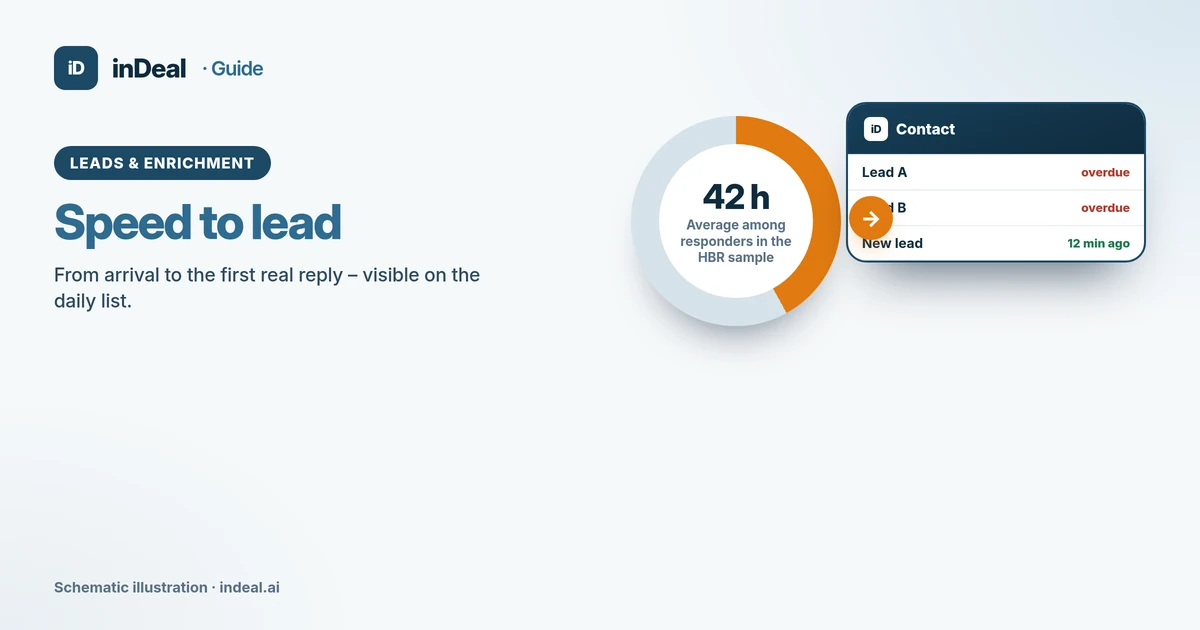
A Harvard Business Review study tested 2,241 U.S. companies with a web-generated inquiry (Oldroyd, McElheran, Elkington, 2011). Only 37% replied within an hour, 16% within one to 24 hours, 24% took more than 24 hours, and 23% never replied. Among companies that responded within 30 days, the average was 42 hours.
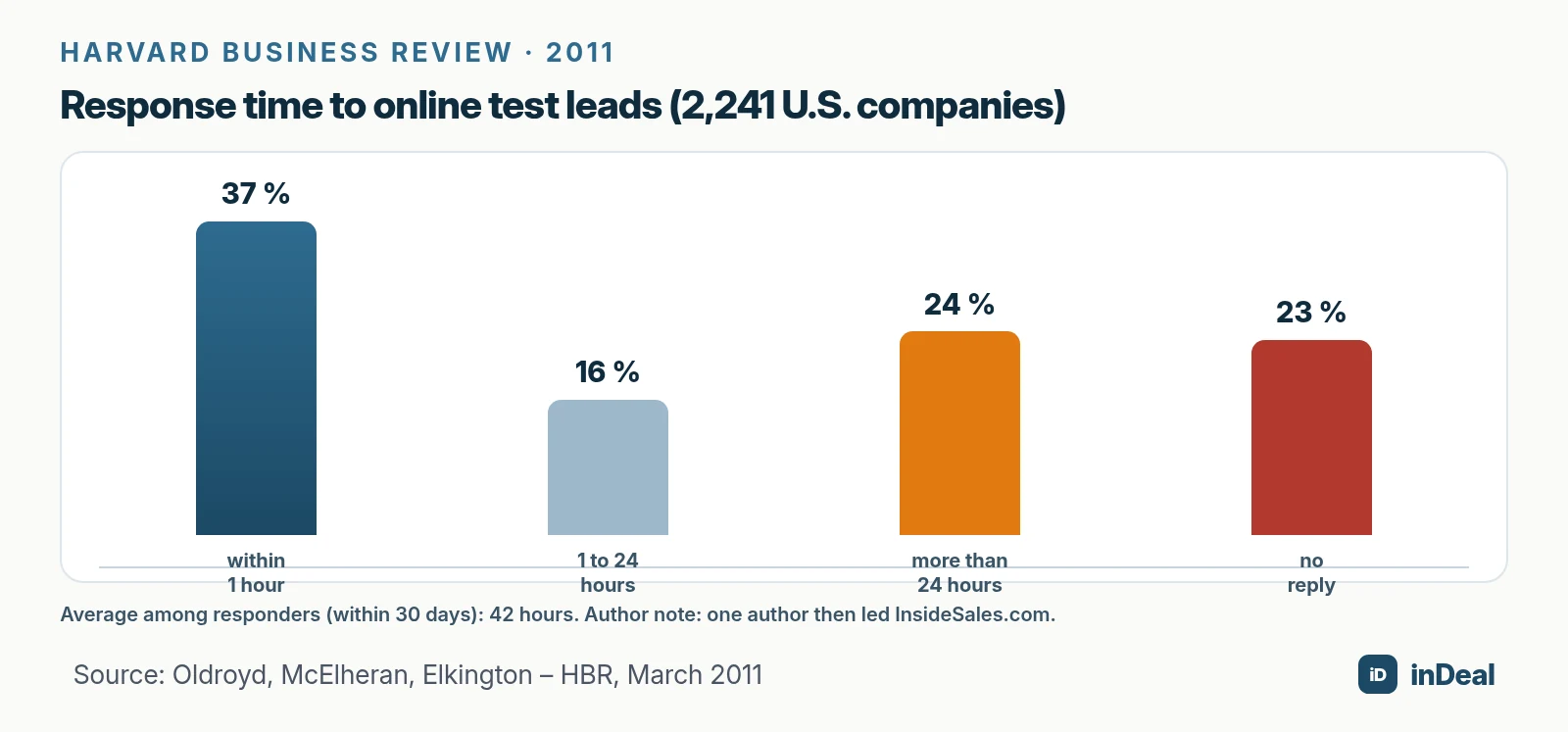
In a second analysis of 1.25 million leads from 42 U.S. companies (29 B2C, 13 B2B), firms that tried to contact a prospect within an hour were nearly seven times as likely to qualify the lead as firms that waited another hour. Qualifying meant a meaningful conversation with a key decision maker.
The data is from 2011 and from the United States. One author, David Elkington, was then chairman and CEO of InsideSales.com, a sales software vendor. The direction is still clear: late replies meet buyers whose need has cooled. Vendor-blog claims about “5 minutes” or guaranteed conversion lifts are not a substitute for this study and should not set your target.
Many small firms still work without a CRM. In 2025, only 24.69% of small EU enterprises (10–49 employees) used CRM software (Eurostat). Without a system, speed to lead stays a guess.
What response time is realistic for a small business?
There is no legal default and no neutral agency that requires “reply in five minutes.” Realistic means what your team can hold on every business day.
| Channel / situation | Realistic target for many small teams | Why |
|---|---|---|
| Website form, business day | Same business day, ideally within a few hours | Need is fresh; competitors often reply later |
| Hot demo or pricing request | Within 1–2 hours in core hours | High intent, short half-life |
| Trade-show scan or business card | Within 1–2 business days | Expectation is lower, but notes go stale fast |
| Inbound after hours / weekend | Next business morning | More sustainable than 24/7 coverage |
| Cold outbound list | Your own cadence, not speed to lead | Follow-up discipline matters more than minutes |
Write the target down and compare yourself to your own prior weeks, not to vendor averages. For the full process, see the pillar Lead management for small business.
How do you measure speed to lead?
Without timestamps, the debate stays emotional. You need two moments: arrival and first contact attempt.
- Arrival: When did the inquiry come in (form, email, import, browser capture)?
- First attempt: When did you call, write, or clearly schedule a follow-up?
- Difference: That is your speed to lead in minutes or hours.
- Outcome: Reached, voicemail, deferred—track separately from duration.
Measure the attempt, not the win. A lead who does not pick up still counts once the attempt is logged. Otherwise you reward teams that only dial “easy” leads.
In practice, a work list that puts new leads on top helps. In inDeal, Contact shows a “New leads” group for contacts that arrived today, with how long ago on the right (Contact – Your daily list).
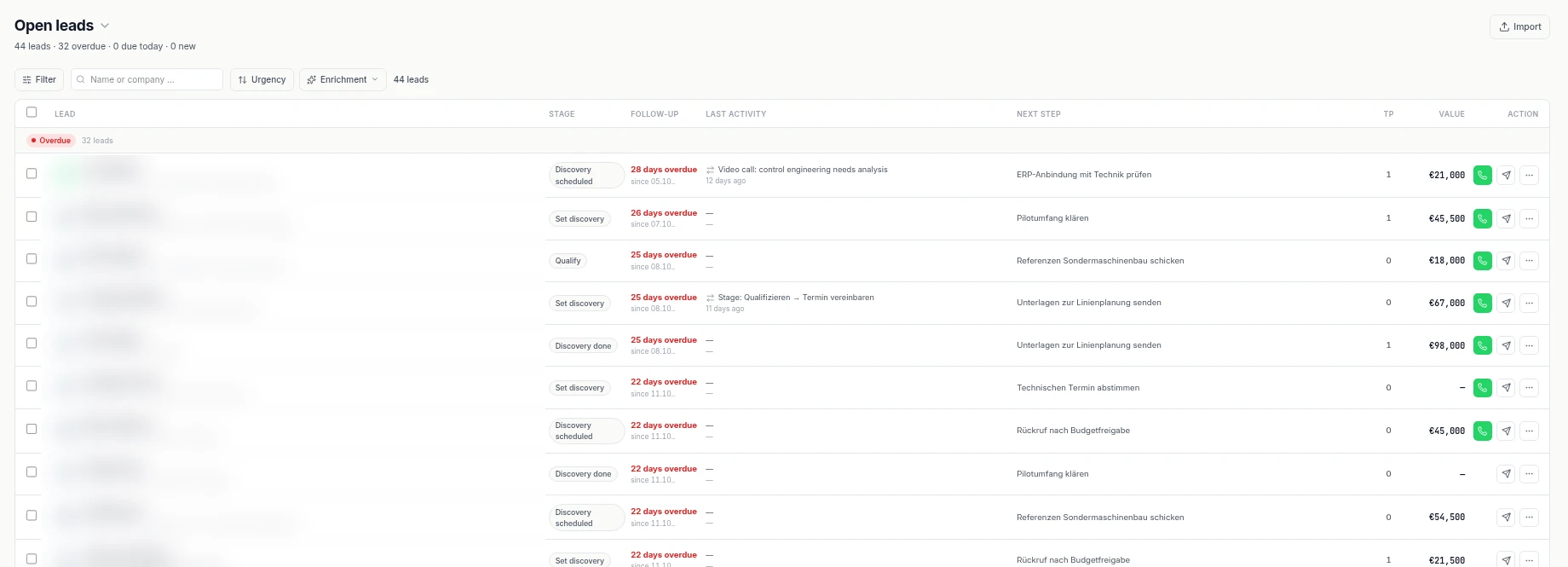
Without a follow-up date, a lead never appears under Overdue or Due today. The help center calls that the most common reason for a short daily list next to a full database.
How do you shorten the time from arrival to first reply?
Speed to lead is mostly process, not tooling. The CRM makes the bottleneck visible and reminds you—you still have to reply.
1. One intake path, one inbox. Website forms, CSV imports, and manual capture should land in the same system. Scattered mailboxes stretch the clock.
2. Make new leads visible immediately. New leads need their own group or saved view. In inDeal that is the “New leads” group on the daily list.
3. Set a next step right away. After the first attempt, set a follow-up date and next-step text. The calendar offers Today, Tomorrow, In 3 days, and Next week, plus an optional email reminder in 15-minute steps (Follow-up with reminder).
4. Assign an owner. Every lead needs one person. Otherwise everyone replies—or nobody does.
5. Do not leave imports cold. After a CSV import, leads stay cold until you set a follow-up (Creating, importing, and enriching leads). Budget about 15 minutes after each import for the first rows.
A free CRM for your whole team. Start inDeal in 2 minutes. Just an email address, no credit card to sign up, unlimited users.
Start freeWhat role do follow-up and workflows play after the first reply?
The first reply is the start, not the finish. Many deals die after “Thanks, we’ll get back to you” because nobody books the next step.
inDeal ships four system workflows that fire on a classified reply (The four workflows in detail):
| Reply | Typical automation in inDeal | What you still do |
|---|---|---|
| Positive, stage Qualify | Stage change, follow-up = today (if empty) | Hold the conversation, prepare an offer |
| Positive, any stage | Notification, optional enrichment | Human judgment and scheduling |
| Neutral | Notification only | Decide whether to follow up |
| Negative | Mark lost (by stage branch) | Log the reason, stop chasing |
The “if empty” rule matters: an existing follow-up is not overwritten. Neutral replies stay without automation on purpose, because they need judgment.
How is speed to lead different from follow-up speed?
Both metrics get mixed up, but they measure different things.
Speed to lead starts at arrival and ends at the first contact attempt. It answers: How quickly do we take new inquiries seriously?
Follow-up speed starts after a conversation or commitment and ends at the next agreed step. It answers: Do we keep what we told the prospect?
A team can reply to new forms in two hours and still lose deals if three weeks of silence follow the demo call. Perfect follow-up also helps little if the first email arrives after four days and the buyer already has three quotes.
Measure both separately. In practice two simple fields are enough: arrival timestamp and “first attempt,” plus the follow-up date for everything after. The Contact daily list covers Overdue, Due today, and New leads—those three groups mirror both disciplines (Contact – Your daily list).
For the full path from capture to deal, Lead management for small business remains the pillar; this article deepens only the stopwatch at the start.
What typically slows down the first reply?
Most delays are org issues, not tool issues. Naming the brakes lets you fix them one by one.
Shared inboxes without an owner. A note to info@ reaches everyone and no one. Decide who clears the inbox in core hours, and route forms straight into the CRM.
Outbound before inbound. Teams that only work cold lists spot new forms too late. The daily list must show “New leads” before cold follow-ups.
No core-hours rule. Without a window (“business days 9–5, target under four hours”), every debate stays fuzzy. Put the rule in the team wiki.
Imports without follow-up. A 200-row CSV with no follow-up dates creates 200 cold leads. Budget fixed minutes after every import for the first contacts.
Fear of the first call. Teams prefer a generic email. For hot forms, a call is often faster; the email documents afterward.
No measurement habit. What you do not measure, you do not improve. Log arrival and first attempt for one week—behavior changes on its own.
| Brake | Symptom | Countermeasure |
|---|---|---|
| Shared inbox | “I thought you had it” | Form → CRM, one owner |
| Outbound first | New leads found at night | New leads on top of the daily list |
| No target | Debate without a number | Written business-day target |
| Cold import | Full list, empty work | Set follow-up right after import |
| Email only | Long threads, no meeting | Call first, then document |
How do you build a weekly routine around speed to lead?
A one-off campaign rarely sticks. A small weekly rhythm does.
Monday: Review last week’s median response time. Where were the outliers—evenings, midday, after imports?
Daily, 10 minutes: Work “New leads” top to bottom before cold follow-ups. Set the next step on every lead you touch.
Wednesday: Sample five website inquiries. Does the CRM timestamp match the form?
Friday: Short team retro: What slowed us this week? Lock one change for next week.
For agencies and IT services with uneven inbound, a buddy model works: person A covers mornings, person B afternoons. The handoff lives in the CRM, not in chat.
Speed alone does not close deals. Qualification, ICP, and clean stages still matter—or you reply fast to the wrong requests. See the pillar Lead management for small business and Lead qualification with BANT.
Which response target fits you?
If you get many website inquiries, an ambitious same-day target and a list that puts new leads on top pays off. If most leads come from outbound or events, a reliable next step often matters more than the first hour.
A free CRM for small business lowers the barrier; an AI CRM for small business adds reminders and reply workflows. Neither replaces the stopwatch: visibility, ownership, and a set follow-up date remain the levers.
Keep reading
- Lead management for small business
- Sales follow-up: next step
- Capture leads from Chrome
- CRM duplicate contacts
- AI CRM for small business
Frequently asked questions
What is speed to lead?
How fast should you respond to a lead?
What did the Harvard Business Review study find?
How do you measure speed to lead in a CRM?
Does an auto-reply count as speed to lead?
How does inDeal help with speed to lead?
Does a 2011 U.S. study still apply to small businesses?
Is inDeal the same as indeal.io?
Sources
inDeal is the AI CRM for small and mid-sized B2B companies.
Keep reading
 Leads and enrichment
CRM Duplicate Contacts 2026: How to Clean Your Data
CRM duplicate contacts: how to spot doubles, what GDPR accuracy requires, and how import dedupe, error reports, and blacklists keep data clean.
 Leads and enrichment
How to Capture Leads from Chrome into a Free CRM (2026)
Capture leads from Chrome without copy and paste: 5 ways from browser to CRM, a lead plugin, website forms via API, GDPR checks and extension security tips.
 Leads and enrichment
Lead Management for Small Business (2026): Process and KPIs
Lead management for small business: a 6-step process from capture to deal, response time, follow-up rules, KPIs, GDPR basics and a free CRM to run it all.