Contents
- What is the difference between a spreadsheet and a CRM?
- How many small businesses still work without a CRM?
- When is a spreadsheet still enough for leads?
- What are the signs you have outgrown your spreadsheet?
- Spreadsheet vs. CRM: which criteria matter most?
- What can a CRM do that a spreadsheet can't?
- What still speaks for a spreadsheet?
- Is a spreadsheet of leads GDPR compliant?
- How do you move from a spreadsheet to a CRM?
- What mistakes happen when switching from a spreadsheet to a CRM?
- Spreadsheet or CRM: which is right for you?
- Keep reading
- Frequently asked questions
- Sources
Spreadsheet vs. CRM mostly comes down to team size and follow-up discipline: a spreadsheet is enough while one person handles a few leads with short sales cycles. Once several people sell from one list or a follow-up slips, a CRM pays off. inDeal (indeal.ai) is a free AI CRM for small businesses from Lars Krüger GmbH, Berlin. Not to be confused with indeal.io, a different company.
As of October 9, 2026. CRM figures from Eurostat 2025; research from Decision Support Systems; law from EUR-Lex (GDPR); product facts from indeal.ai and success.indeal.ai.
What is the difference between a spreadsheet and a CRM?
A spreadsheet stores data; a CRM runs the work. A spreadsheet shows what you typed in. A CRM also shows what needs doing today, who owns it and what happened last.
Technically, both can hold a contact list. The difference comes down to three things a spreadsheet does not have out of the box:
- Time: A CRM knows due dates and reminds you. A spreadsheet waits until someone sorts by date.
- History: A CRM logs calls, emails and meetings on the lead. A spreadsheet usually holds only the latest status in a notes column.
- Ownership: A CRM assigns roles and leads to people. A spreadsheet only knows who has the file open.
What about Google Sheets?
Google Sheets fixes one Excel problem: everyone works in the same file instead of copies. The other gaps remain. There are no reminders for due follow-ups, no history per lead and no row-level roles. For this comparison, Excel and Google Sheets count as one category.
How to set up a clean spreadsheet while it still works is covered in Manage leads in spreadsheets. This guide answers the next question: when is it time to move on?
How many small businesses still work without a CRM?
Most of them. According to Eurostat, only 28.51% of EU enterprises with ten or more employees used CRM software in 2025. Among small enterprises with 10–49 employees it was 24.69%; among large ones, 65.43%.
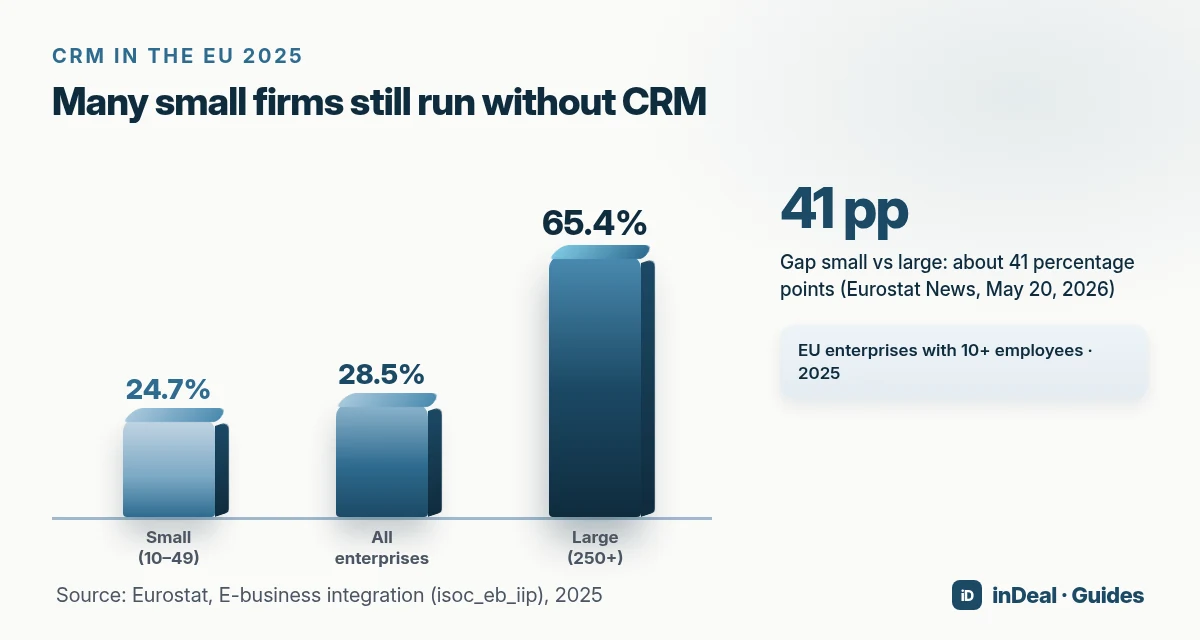
Eurostat News puts the gap between small and large enterprises at about 41 percentage points. Micro businesses under ten employees are not covered by the survey. If you run sales from a spreadsheet, you are in good company, but not automatically in good shape.
When is a spreadsheet still enough for leads?
A spreadsheet is enough when all four conditions hold. If one is false, it is time to consider a CRM.
- One person maintains and works the list.
- Deals are short: one call, one quote, done.
- No follow-up has slipped so far (answer honestly).
- You need no metrics on conversion or revenue forecasts.
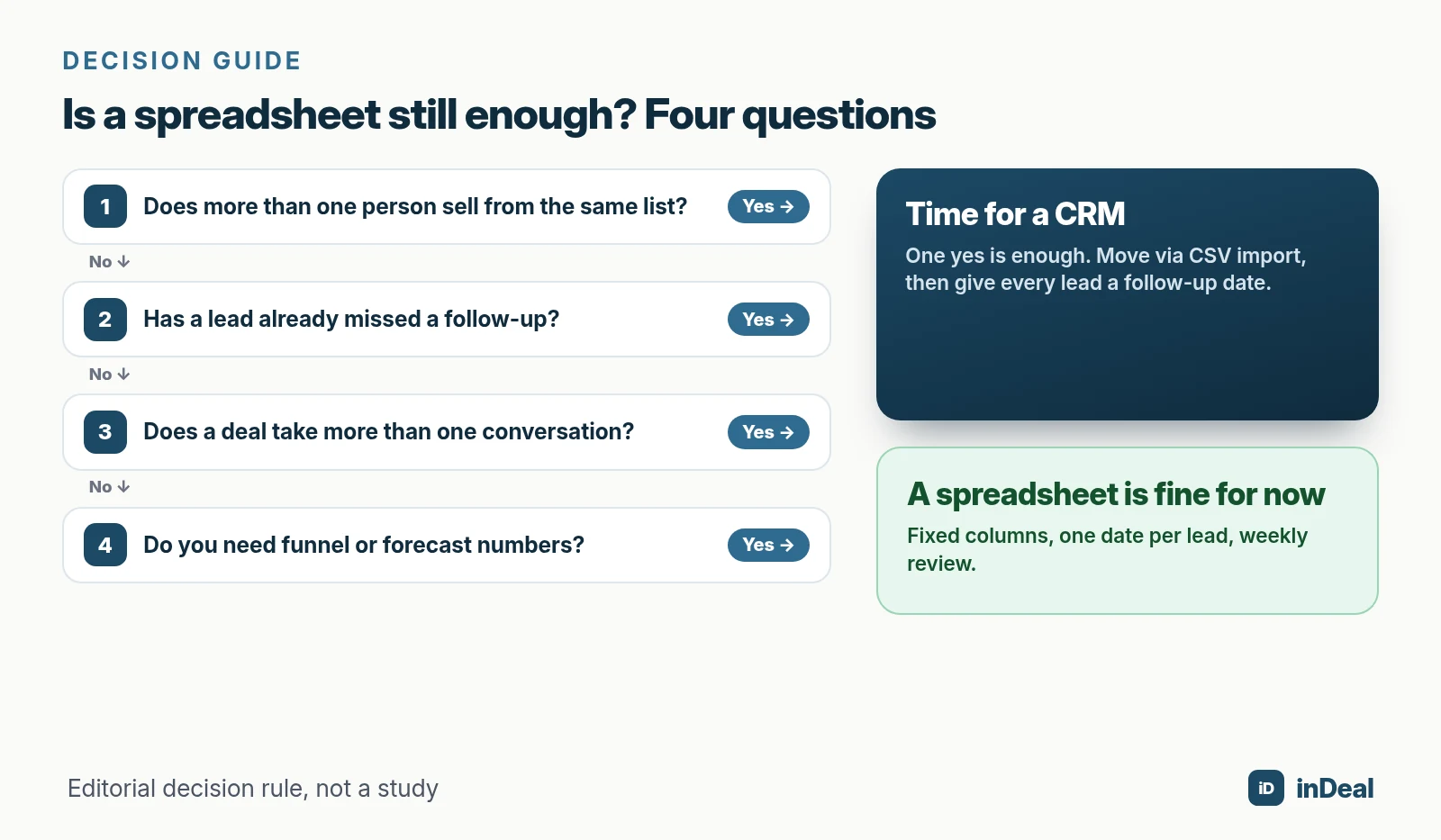
A spreadsheet typically fits founders in their first months, side projects or a one-off trade-show list. In that case: fixed columns, one follow-up date per row and one fixed slot per week to sort the list by date.
What are the signs you have outgrown your spreadsheet?
Usually not the row count but small slip-ups. These five signals show up again and again in small sales teams:
- Double outreach: Two people email the same lead because the file was out of date.
- "Who spoke to them last?" The answer is in someone's inbox, not in the list.
- Versions: "Leads_final_v3_new.xlsx" lives in three folders.
- Missed callbacks: A warm lead gets back to you after three weeks and reaches someone else.
- No numbers: "How many meetings did we have in September?" costs an hour of counting.
Then there is the risk of spreadsheet errors. Powell, Baker and Lawson (2008) summarize the research: errors in operational spreadsheets are widely considered common and can lead to poor decisions. The literature does not, however, allow a reliable estimate of how frequent they are.
For a lead list, that means a mis-sorted column or an overwritten cell often goes unnoticed until a customer asks.
Spreadsheet vs. CRM: which criteria matter most?
Seven criteria decide in day-to-day selling. The table shows where spreadsheets are strong and where a CRM takes work off your plate.
| Criterion | Excel / Google Sheets | CRM (e.g. inDeal) |
|---|---|---|
| Start and cost | Instant, usually already on hand | Free plans exist; inDeal: €0 per user |
| Follow-up | Date in a column, no reminder | Follow-up date with email reminder and daily list |
| Multiple users | Simultaneous edits, versions, overwrites | Roles, assigned leads, one shared state |
| History | Notes column with the latest status | Calls, emails, meetings as activities on the lead |
| Copy by hand | Mailbox connected, replies land on the lead | |
| Reporting | Maintain formulas and pivots yourself | Funnel, pipeline and forecast from the same data |
| Data protection | Files get copied and emailed | Access rights, DPA; check the vendor |
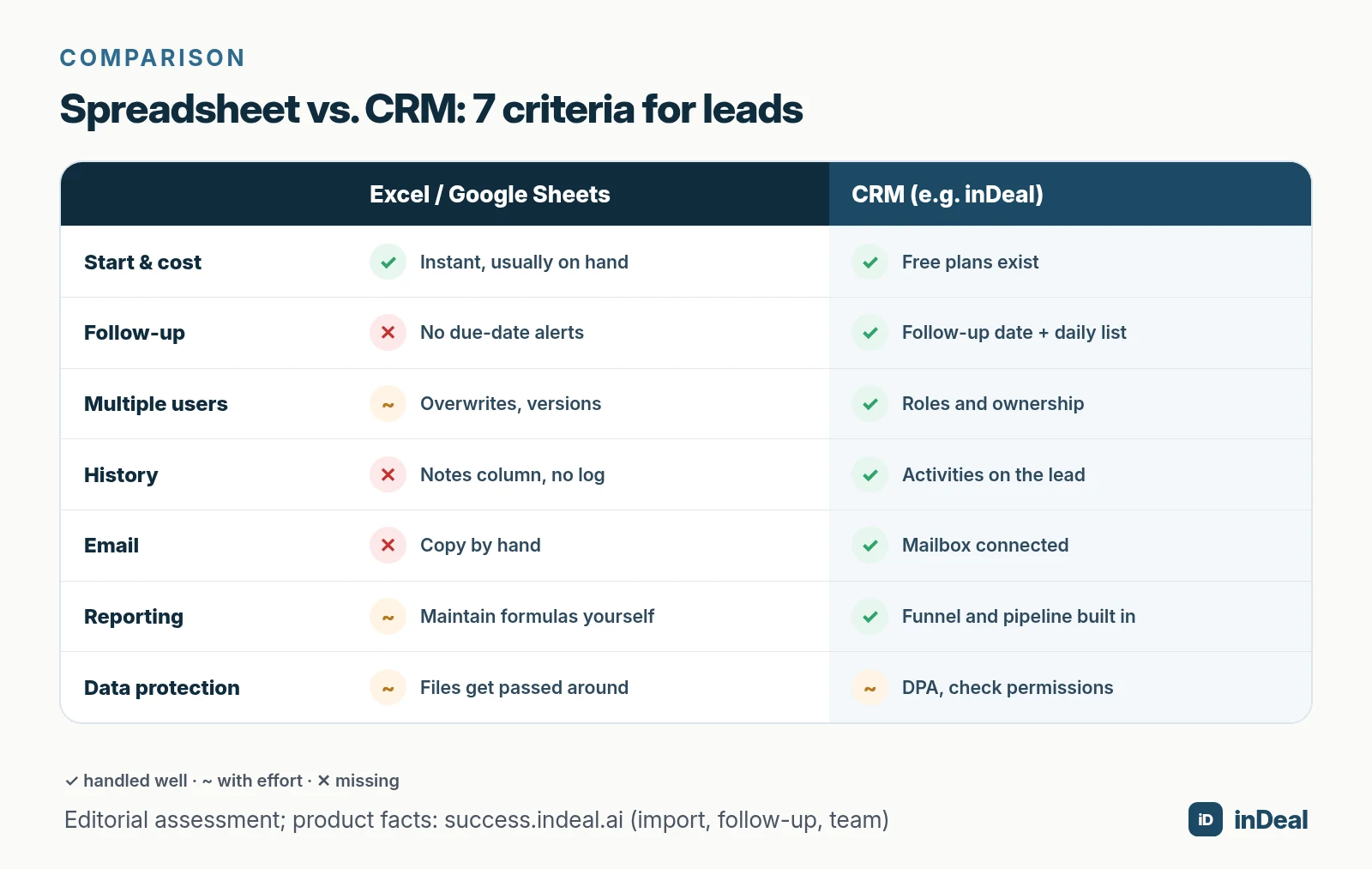
On start and cost, spreadsheets win, but only narrowly now that free CRM plans exist. On data protection, neither side is automatically better: it depends on your rules and the vendor.
What can a CRM do that a spreadsheet can't?
Mainly one thing: remind you at the right time. Everything else follows from that.
Follow-ups that speak up
In inDeal, every lead gets a follow-up date. According to the Help Center, you can pick a time and turn on an email reminder. The reminder goes to the person the lead is assigned to.
The Contact list splits the day into Overdue, Due today and New leads. With a spreadsheet you would have to filter for that every morning.
A timeline instead of a notes column
You log calls, LinkedIn touches, emails and meetings on the lead. Per Activities, notes and history, this builds an activity list anyone on the team can read.
With a connected mailbox (Outlook/Microsoft 365 or Gmail/Google Workspace), your leads' replies land in their timeline automatically.
Roles instead of file permissions
Per Managing the team, inDeal has two roles: Admin with full access and Sales, which sees and edits only its own leads, with no import, deletion or bulk updates. In a shared spreadsheet, everyone sees and can change everything.
A pipeline instead of a status column

Instead of a free-text "status" column, a CRM has fixed stages. In the inDeal demo instance you see open volume and confidence per stage at the top. How the stages fit together is explained in Sales funnel vs. pipeline.
What still speaks for a spreadsheet?
Spreadsheets have real strengths, and leaving them out would be dishonest:
- No new tool: Everyone on the team already knows it.
- Total freedom: Columns, colors and formulas as you like.
- Offline and local: No dependency on a vendor.
- Great for one-off lists: Trade-show contacts, research, cleaning data before an import.
That freedom is also the weakness. Without fixed stages, each person writes "interested", "hot" or "will get back". Reporting turns into guesswork.
Is a spreadsheet of leads GDPR compliant?
The GDPR does not ban spreadsheets. It does require personal data to be processed lawfully, for a specific purpose and securely (Art. 5 and Art. 32 GDPR). It applies to anyone processing data of people in the EU.
With spreadsheets, that is harder to demonstrate:
- Copies travel by email and sit on laptops.
- Access can hardly be limited to individual rows.
- Deletions have to happen in every version.
A CRM does not take responsibility off your hands. It does make access, deletion and data processing agreements easier to control. Per indeal.ai, inDeal stores data on servers in the EU (Frankfurt), with tenant separation at database level and a DPA included.
How do you move from a spreadsheet to a CRM?
In five steps, in one morning. The cleanup before and the discipline after matter more than the import itself.
- Clean up: Remove duplicates, one row per person, standardize company names.
- Prepare columns: First name, last name, email, phone, company, role, website, estimated value.
- Save as CSV: The first row must contain the column headers.
- Import and map: Per the Help Center, inDeal maps recognized columns automatically. Attach the rest as a note or create custom fields.
- Set follow-up dates: Every active lead gets a next step with a date.
Step 5 matters most. According to the Help Center, imported leads start cold: stage Qualify, no follow-up date. They therefore do not appear in Open leads, only in All leads, until you set a date or a reply comes in.
| Spreadsheet column | Target in the CRM | Note |
|---|---|---|
| Name, first name | First name, last name | At least a name, email or LinkedIn URL is required |
| Company | Company | Standardize spelling first |
| Status (free text) | Attach as note | Then set a real stage |
| Next contact | Follow-up date (by hand) | Set for active leads after the import |
| Source | Lead source | Set once per import in inDeal |
| Custom columns (e.g. budget) | New custom field | Type is suggested from the values |
Per the Help Center, an import can be moved to the trash again from the import history. That takes the fear out of the first try. How to qualify leads after the import is covered in Lead qualification with BANT.
What mistakes happen when switching from a spreadsheet to a CRM?
Most switches fail not because of the tool but because of old habits. These six mistakes are the ones I see most often in small teams:
| Mistake | Consequence | Better practice |
|---|---|---|
| Importing everything, including dead contacts | Full lists, empty pipeline | Filter first, park the rest in All leads |
| No follow-up date after the import | Leads appear in no work list | Schedule active leads on import day |
| Keeping the spreadsheet going in parallel | Two truths, double work | Set a cut-off date, make the file read-only |
| Copying free-text status | No comparable stages | Status as a note, then set a real stage |
| Inviting everyone as Admin | Anyone can import and delete | Sellers with the Sales role, few admins |
| Not connecting the mailbox | Gaps in the history | Connect Outlook or Gmail on day one |
The most important point is the cut-off date. As long as the old spreadsheet lives on, someone keeps typing into it. Pick a day from which only the CRM counts, then archive the spreadsheet as read-only.
Also plan a short kickoff for the team: who sets which stage, what counts as a valid next step, when a lead gets marked as lost? Those three rules on one page beat any long manual. More in Sales follow-up.
Spreadsheet or CRM: which is right for you?
It depends on your day-to-day work, not on the size of your list. A recommendation by situation:
- You are just starting out alone: Excel or Google Sheets with fixed columns and one date per lead. Plan the switch as soon as the first follow-up slips.
- Two or more people sell: CRM. Double outreach and version chaos cost more time than the setup.
- Your deals need several conversations: CRM. Without history and reminders you lose the thread between meeting and quote.
- You want to know where deals get stuck: CRM. Funnel rates from a spreadsheet cost hours every month.
- Budget is tight: A free CRM for small business like inDeal costs €0 per user. What free plans usually limit is covered in the free CRM limits checklist.
How a CRM runs day to day after the switch is described in the pillar CRM sales process. Where AI helps is explained in AI CRM for small business.
A free CRM for your whole team. Start inDeal in 2 minutes. Just an email address, no credit card, unlimited users.
Start freeKeep reading
- Manage Leads in Spreadsheets: When Excel Is Enough
- CRM Sales Process 2026: 7 Steps for Small Businesses
- Free CRM for Small Business (2026)
- Sales Follow-Up: How Often and Why Every Deal Needs a Next Step
- AI CRM for Small Business: What It Can Do in 2026
Frequently asked questions
Is Excel a CRM?
How many leads do you need before a CRM makes sense?
Can I import my spreadsheet into a CRM?
Google Sheets or CRM: which is better for a small business?
Is a CRM more expensive than a spreadsheet?
Is a spreadsheet with customer data GDPR compliant?
How long does it take to move from a spreadsheet to a CRM?
Is inDeal the same as indeal.io?
Sources
- E-business integration (Statistics Explained)
- Larger enterprises used more e-business apps in 2025
- A critical review of the literature on spreadsheet errors (Decision Support Systems 46(1))
- Regulation (EU) 2016/679 (General Data Protection Regulation)
- inDeal: home page, pricing and FAQ
- Creating, importing and enriching leads
- Follow-up with reminder
- Contact: your daily list
- Activities, notes and history
- Managing the team
- Connect your mailbox
Keep reading
 Leads and enrichment
Lead Qualification with BANT: Small Business Guide 2026
Lead qualification with BANT for small business: budget, authority, need, and timing questions, BANT vs. MEDDIC and CHAMP, and how to map it to CRM stages.
 Leads and enrichment
Manage Leads in Spreadsheets: When Excel Is Enough
Manage leads in a spreadsheet: when Excel works, five limits (history, follow-up, multi-user, enrichment, GDPR), a column template, and CSV import into inDeal.
 Comparisons
CRM Without Per-User Pricing: How It Works in 2026
CRM without per-user pricing explained: four CRM pricing models, a worked cost example and six questions to ask before you switch your small business.